One-to-One Video in B2B Outbound Sales Sequences
Personalized video works best after prospect engagement, not as your opening move in outreach.
Cold email converts only 3.43% of the time. That's why groups grab personal video as the answer, and why plenty of them mess it up. Video earns its reply rate only at a specific moment in a sequence, based on what the prospect already understands about the rep. Use it on every touch, and it turns into one more thing to skip in an inbox already packed with things to skip.
What pressure standard outbound tactics' failure is producing
Out of every cold emails sent, nearly all get left hanging at a 3.43% reply rate. Reps begin looking for something sharper from that baseline, and video adoption picked up so quickly because of it. But quick adoption should raise concern, not confidence. Video is moving toward the saturation cold email saw ten years back, and reps using it as a novelty instead of a real process will notice that change before anyone else, likely before they can say why their results fell.
Most outbound teams aren't watching the part of the funnel where the real problem starts. B2B buying teams routinely set their vendor shortlist ahead of any sales conversation, and they usually stick with that first pick. Differentiation comes before the call is set, where a well-placed video can do what templated email never could. Sales teams obsessing over their follow-up email cadence are addressing the wrong challenge. They had already chosen before touch one arrived.
What one-to-one video is (and what it isn't)
It's a custom recording, 45 to 90 seconds long, aimed at a single lead. It opens by name, references something specific about their work, and closes with a question they can answer without thinking. Three formats are lumped together here, and they work very differently. Measuring success against a vague "video" benchmark while ignoring which format you actually use is how teams fool themselves.
Generic recordings are just one video blasted to all prospects, a name slapped on for show. They're quick to produce, low on personalization, yet prospects catch on within three seconds.
Manually made 1:1 videos land on the opposite end. Fully custom, with maximum personalization, but a rep can produce only a limited number of fully custom videos before the format becomes time-intensive. This won't cover a full territory, and reps wear out forcing a format meant for boutique volume into a pipeline.
This approach strikes the right balance, and it deserves a clear way to do it. A seller films one base clip, an AI tool speaks each buyer's name in their tone, and the screen behind them loads that person's LinkedIn or site live. The personalization depth feels almost hand-recorded, without the volume limit that breaks it as outreach grows.
A video where the rep records themselves and what they're showing together outperforms selfie-only or screen-only formats for response rate. Showing the person alongside what they're showing wins confidence more quickly than either piece on its own.
Length is changing quickly too, and reps who miss it are already getting punished. B2B video length went from 168 seconds back in 2024 down to 76 seconds by 2026. A video gets penalized purely for its runtime, even before the rep opens their mouth.
The performance data (and what it tells you about placement)
The top-line figures seem impressive on their own. Custom clips get 10% to 16% responses, hitting 30% with heavy tailoring, compared to the 3.43% cold standard. Emails with video included get a 26% rise in reply rates. Signal-based personalized video on LinkedIn gets 15% to 30% response, versus the low single-digit rates typical of cold outreach on LinkedIn.
One common shortcoming of published benchmarks is that they compare "teams that use video" against "teams that don't." That comparison hides where in the sequence the video actually sat. A video sent at touch one performs nothing like one dropped at touch four, and pooling every placement together blurs adoption with strategy. A rep who puts personalized video at touch one in a cold sequence and counts on 30% reply rate is misreading the numbers.
Placement, not format, drives the result. Use the figure but miss the placement, and it will not reproduce. In the LinkedIn outreach set off by a prospect signal, whatever concrete cue made that moment worth reaching out accounts for at least as much of the outcome as the video. Possibly more.
Where video earns its place in a sequence
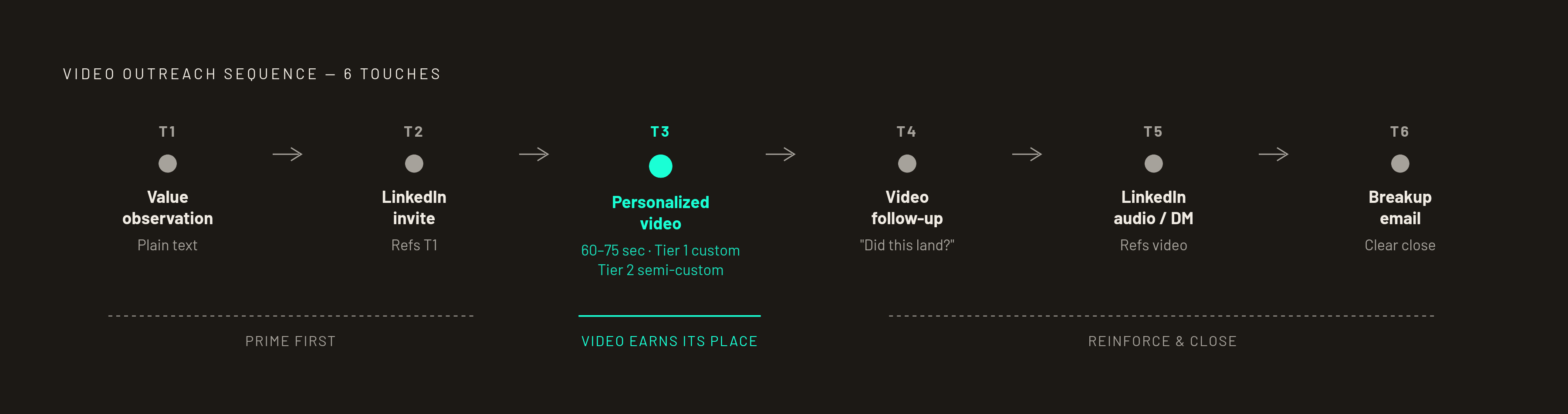
Outreach benchmarks suggest it often takes multiple touches to reach a cold prospect. Video is one placement in that cadence and earns most after the prospect has noticed the rep's signal, not as the opening message from someone unknown.
Two real examples lay out how it works.
The 7-touch sequence starts with a personalized video running 60 to 75 seconds, showing the prospect name and website in the background alongside one specific observation and a single ask. Three days later, an unformatted email referencing the video by name arrives, carrying one credibility signal: a metric, a familiar customer, or a relevant example the prospect will spot.
The 6-touch sequence spreads contact methods out and delays video by design. Touch one is one line naming a value observation, sent as plain text. Touch 2 is a LinkedIn invite referencing touch one. The personalized video comes at Touch three, not touch one, with Tier 1 accounts fully custom and Tier 2 semi-personalized. For Touch four, send a video follow-up with the thumbnail reattached, asking something like "did this land?" Touch five goes to a LinkedIn audio message or DM that references the video. The breakup email is touch six: clear ending, minimal friction, invite to reply.
Video falls flat as a cold introduction. It performs best after the prospect has already gotten either a LinkedIn signal or text touch. The 6-touch framework puts touch three in that spot, not as the first touch. Teams that open with video because it seems like their biggest advantage play their top card too soon.
The schedule compounds all of this. Tuesday emails tend to outperform Friday ones in both opens and replies, so live clips often perform well midweek, particularly in the morning hours.
Mid-funnel and post-demo: the sequence positions most teams underuse
Most reps keep video to the prospecting tool role and go no further. Those prime opportunities get ignored, and that's the real mistake.
The mid-funnel stage gets dropped the most often. Weeks pass between touchpoints on a real B2B deal, and the standard "just checking in" email competes against an inbox already ignoring three other vendors doing the exact same thing. A short video shifts the deal's direction without making the rep begin it all over again.
After the demo, the biggest missed chance is the follow-through, period. Follow-up video messages after a demo convert significantly better than text emails, particularly when the clip revisits the exact worries the buyer brought up during the meeting. Being that specific means it isn't just another "thanks for your time" email. It shows the rep was paying attention.
Another miss: new decision-makers join later. Most B2B deals pull in extra stakeholders mid-deal, and the rep has no easy way into a conversation they weren't brought into, until the champion sends along a brief, personalized video. This extends the rep's reach into meetings they'd otherwise miss.
Stalled opportunities complete the picture. If urgency fades or the offer stalls, a targeted objection-specific video that calls out the team’s worry, not "any updates?", can push the sale ahead. A check-in simply sits and waits with the prospect.
The mechanics that determine whether a video gets watched
The placement plan is useless if the email stays closed. A prospect clicks to make the video itself matter, since the subject line and thumbnail work as gatekeepers.
Just adding "video" to a subject line lifts rates by 6%. Reps who front-load it, something like "[VIDEO] quick thought on your Q3 rollout," pair the format cue with a short hook. Personalized thumbnails with a prospect's name or business mark grab attention before the video even starts. Backlinko's look at 12 million outreach emails showed personalized outreach pulls a 32.7% better reply rate than generic outreach, and personalized thumbnails can help grab attention before the video even starts.
Plenty of reps miss this: Gmail and Outlook handle most inboxes for B2B, yet neither plays embedded video playback. Forcing it straight into the email can set off filters. Link the thumbnail instead, sending viewers to a web page.
The video follows a four-part sequence to keep people watching. A personalized hook in the first 5 to 10 seconds names the prospect and one specific observation, never a generic "I help companies like yours." The next 10 to 15 seconds name something concrete pulled from their LinkedIn: a recent announcement, a pain tied to their actual role. The next 20 to 30 seconds tie that observation to a proposition, framed not as a pitch but as an implication for them. Close out the last 10 seconds with a single low-friction prompt, something answerable by no or sure.
There's a minimum standard to meet, even with no cap. Good light, a working microphone, and a plain background are the baseline, since prospects judge credibility the instant they see a stranger's screen. High-end production isn't required. Coming off like it was filmed in a lot is what hurts.
Tooling options for teams building a 1:1 video practice
Tools should fit the workflow already in place. Headcount, sequence depth, and whether priority sits with analytics, simplicity, or reach all steer buyers toward separate tools. A bad choice stalls adoption visibly, and the stats show it right away.
Sendspark is for BDRs and SDRs handling heavy volume. From one recording, AI cloning generates personalized clips, backgrounds grab the LinkedIn or prospect's website on their own, and the tool integrates with Smartlead, Apollo, Outreach, HubSpot. It works for teams that want volume without losing personalization depth.
Vidyard is built mainly for AEs and larger teams, with AI-presenter videos, CRM-connected reporting, and deal-progress tools. HubSpot, LinkedIn, Microsoft, and S&P Global run on it. Pricing starts at just $59, though larger teams may incur significant annual costs, particularly when adding CRM or sequencer integrations.
Atlassian took over Loom in 2023; it was meant for async company updates, not bulk outreach, and the limits are clear. The free tier has certain limitations on video length, and the platform has no setup for handling high-volume, personalized outreach sequences. The $12.50 is where pricing starts. Works for async follow-up sometimes. Forcing systematic prospecting onto it happens often, and the sequences quickly show the strain.
BombBomb puts relationship-driven selling first. Record without limits, get real-time notifications on views, heatmap analytics for viewer drop-off, and CRM integrations that work well. Reply rates run between 10% and 18%. It’s a better match for an AE with a small, higher-touch account list than for high-volume work run by a big outbound group.
The priority of scaling volume, tracking pipeline influence, or supporting one-to-one relationship selling determines the right tool. It comes down to whether the priority is scaling volume, watching pipeline influence, or backing one-to-one relationship selling, since each route leads elsewhere, and going by a features rundown rather than that priority is how teams shell out for capability they don't touch.
Beyond tooling: when a product is hard to explain and a rep’s recording can’t do the job, purpose-built video built on what differentiates it anchors the touch better than software. This choice is about content creation, not software, and it fits with the platforms above without taking their place.
How to measure whether video placements are working
Plays are a vanity metric. It only confirms to a rep that the video opened. Three things show if video prospecting pays off: reply rate, watching through to the end, plus demos set.
Full-video views matter more than most sales teams think. A prospect who watches to the end yet still won't reply is a solid signal, and they deserve a follow-up distinct from one sent to a prospect who never clicked on the thumbnail. CRM video tracking makes those watch patterns something a rep can use, not just a metric left unused on a dashboard.
Length shows up here once more, now serving as a diagnostic instead of a style choice. Clips over 90 seconds lose 40% of viewers before the end. A weak finish rate points to the video going on too long or missing the mark at that point in the sequence.
With AI-personalized clips, about half of responses turn into first meetings. That share shows whether the video pulls prospects in or simply generates clicks from leads with no intent to buy. When lots of people reply but few book calls, the targeting is at fault rather than the video itself.