Product Demo Video Best Practices for SaaS
Build demos around buyer problems, not product features, to drive conversions.
SaaS sites with product video convert at 4.8% versus 1.9% without. That's a nearly 2.5x lift, and it gets cited constantly, but the number alone tells you nothing useful.
The gap comes down to whether the video actually does the sales job. Eighty-four percent of buyers say they were persuaded to purchase after watching a product demo, and 94% say video built their purchase confidence during evaluation. Wyzowl's 2026 research found that 83% of video marketers say video directly increased sales, and 85% say it helped generate leads. I've seen enough of these studies across enough years to stop treating them as coincidence.
Video's persuasive power is real, but conditional. A video that bores or confuses a prospect earns none of these outcomes; it just burns the attention the buyer was willing to give you. The conversion ceiling is genuinely high, and most demos never approach it for the same reason: the video was built around the product, not the buyer.
73% of SaaS homepages carry no product video at all, so the baseline is low to start with. The videos that do exist often replicate the walkthrough mistake anyway, which means the actual opportunity is larger than the raw conversion gap suggests.
Building the script around the buyer's problem, not the product's features
Where the script begins is what separates a demo from a walkthrough. A walkthrough opens on the interface. A real demo opens on the buyer's current pain, and the product enters the story only after that pain is already established.
The four-part logic that actually works: problem, before-state, transformation, result plus CTA. You can also frame it as tell (what you will see and why it matters), show (the product doing it), tell again (what just happened), then direct the viewer somewhere specific. Either framing points to the same discipline: earn the demo before you run it.
Show the end result in the first ten seconds, then walk backward through how it gets achieved. Most viewers drop before the 30-second mark if they cannot see what the product does for them. The hook earns the rest of the video; the rest of the video does not justify a weak hook.
The persona problem is real and consistently underestimated. A marketing director and a CTO have different problems, different vocabularies, and genuinely different stakes in the same product, even when they're evaluating the same tool. A script written for everyone persuades no one. Tailoring means choosing which workflows to show, not just softening the language; you pick the use case that solves that buyer's specific problem and cut everything else.
One test worth running: does the viewer see an automated process, a saved hour, a generated report, or a concrete growth number? If not, the script is still describing the product rather than proving its value. Completeness is the enemy of persuasion here.
How long a demo video should actually be
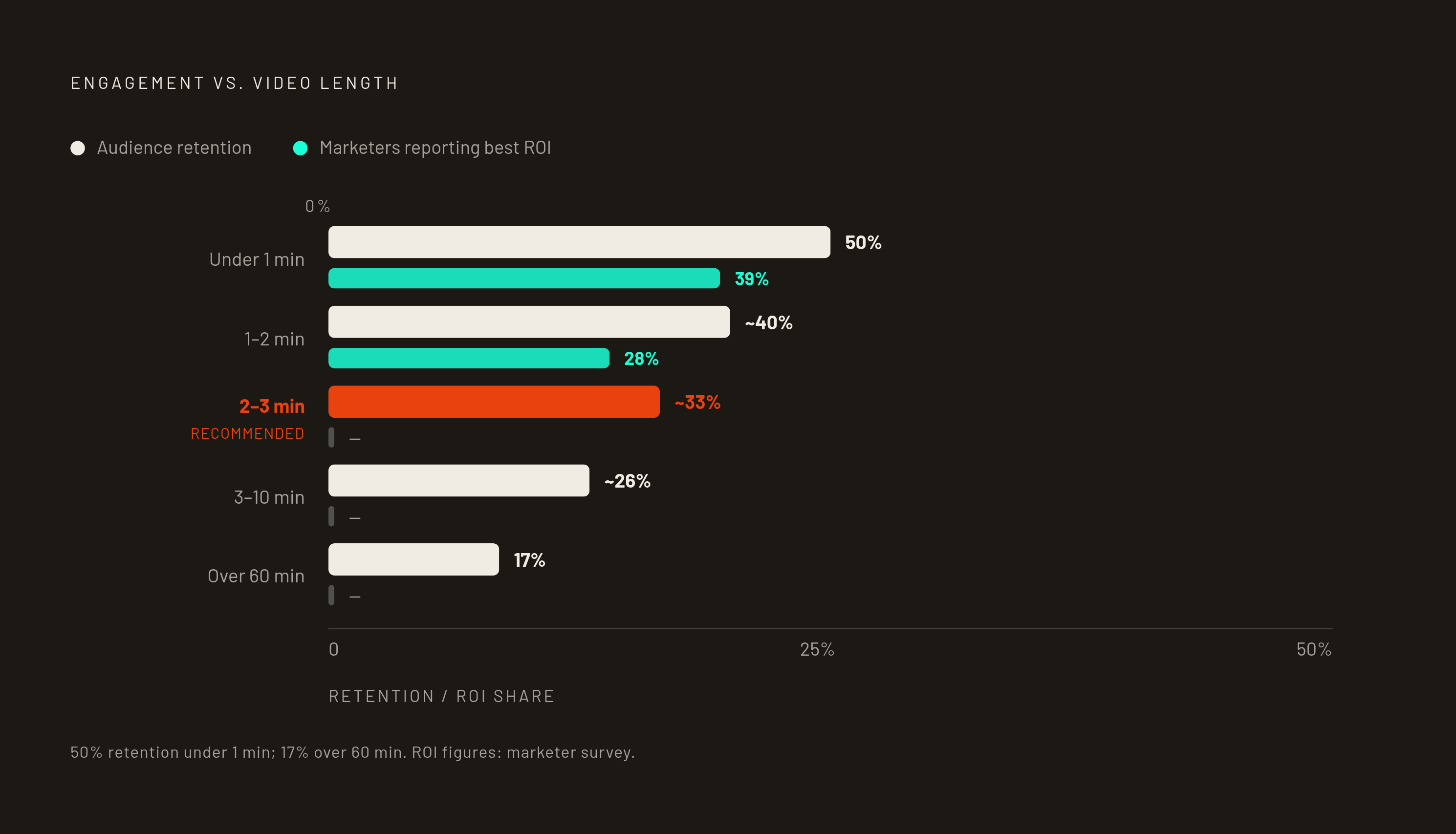
Length follows context. Top-of-funnel awareness and feature announcements: 60 to 90 seconds. Sales and homepage demos: 2 to 3 minutes. Support walkthroughs: under 5 minutes.
Engagement data gives you the ceiling. Videos under one minute hold 50% engagement; videos over 60 minutes drop to 17%. Thirty-nine percent of marketers say 30 to 60-second videos deliver the best ROI, while 28% say 1 to 2 minutes. Shorter wins more often than intuition suggests, and most teams find this out the hard way.
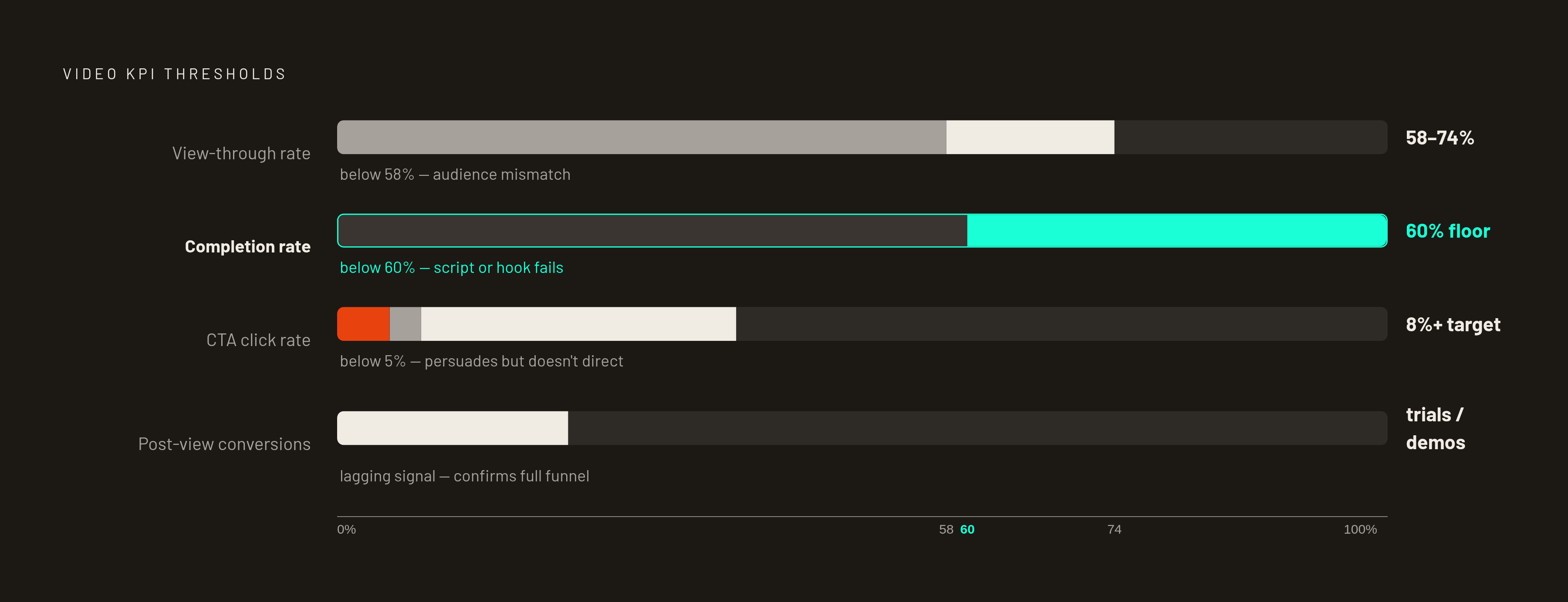
For on-demand demos, 60% view completion on a two-minute video is the floor you're working toward. Below that, the video is either too long or loses the thread early enough that the buyer stops caring before you've made the argument.
Length is almost always a symptom of a script problem underneath it: too many features, not enough focus on a single buyer outcome. If you can remove a section and the buyer's journey still holds together, remove it.
The format decision: what kind of demo video fits which stage
The format question is a funnel question. Different stages require genuinely different things from the viewer, and no single format covers all of them well.
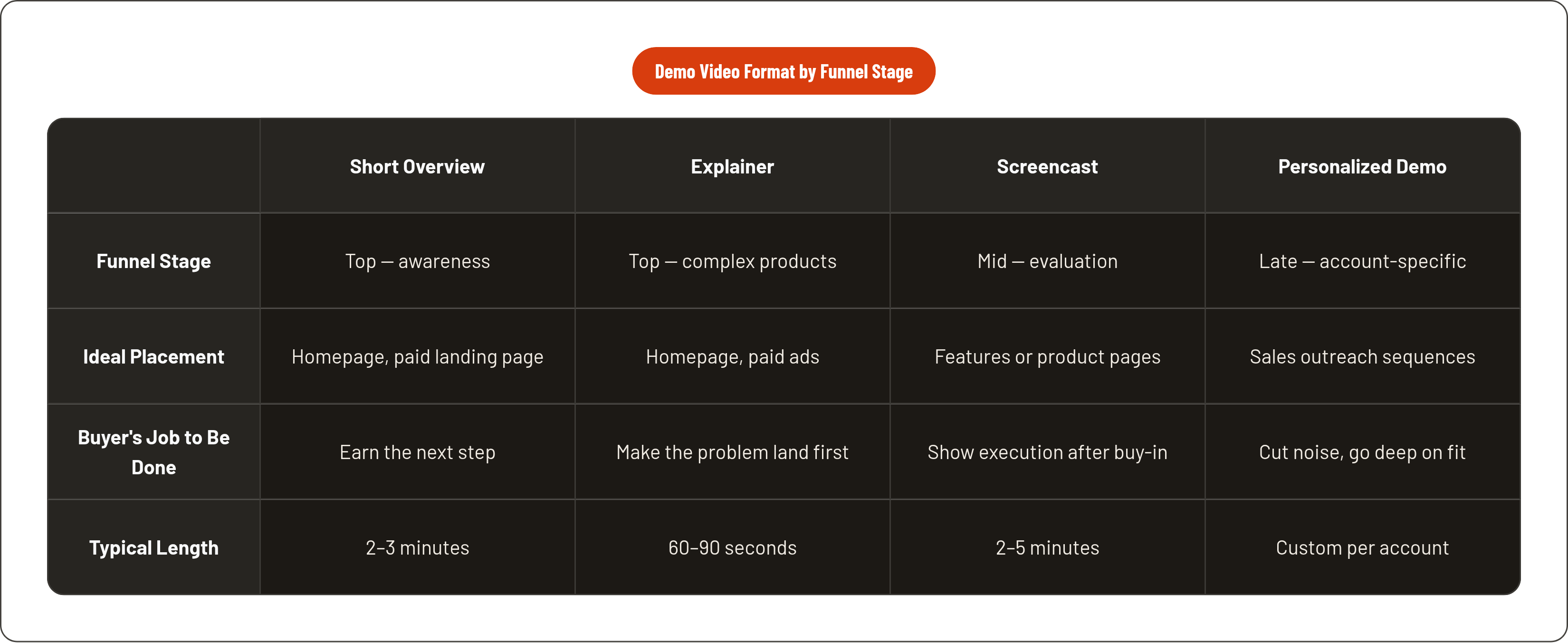
A short overview demo, 2 to 3 minutes, belongs on the homepage or a paid landing page. Its job is to earn the next step, not close the deal. An explainer video leads with the problem and outcome through storytelling and motion graphics, often avoiding the interface in detail; this works for complex products where the "what" needs to land before the "how." Show the UI too early and you lose buyers who haven't yet accepted that they have the problem.
A screencast demo shows the actual UI in motion and works best once the buyer already believes the category matters and wants to see execution. A custom or personalized demo video built for a specific account cuts irrelevant features, goes deeper on what matters to that buyer, and earns its extra production time in later-stage outreach for exactly that reason.
Format choice is also a resource question. Almost 40% of companies spent under $5,000 producing videos last year, per Wistia's 2026 State of Video Report. A screencast with professional voiceover sits at the accessible end of that range and is usually the right starting point before committing to more produced formats. Attraction, evaluation, and purchase each need something different from the video. Build accordingly.
Where interactive demos fit alongside video — and where they don't replace it
The headline circulating is that interactive demos convert at 7.2x the website baseline. The underlying data: Storylane and Factors.ai reported 24.35% conversion for visitors who engaged with an interactive demo versus a 3.05% overall website baseline, across 110,257 sessions in 2024. That's engagement-to-conversion, not a controlled head-to-head against video. Worth understanding before you cite it.
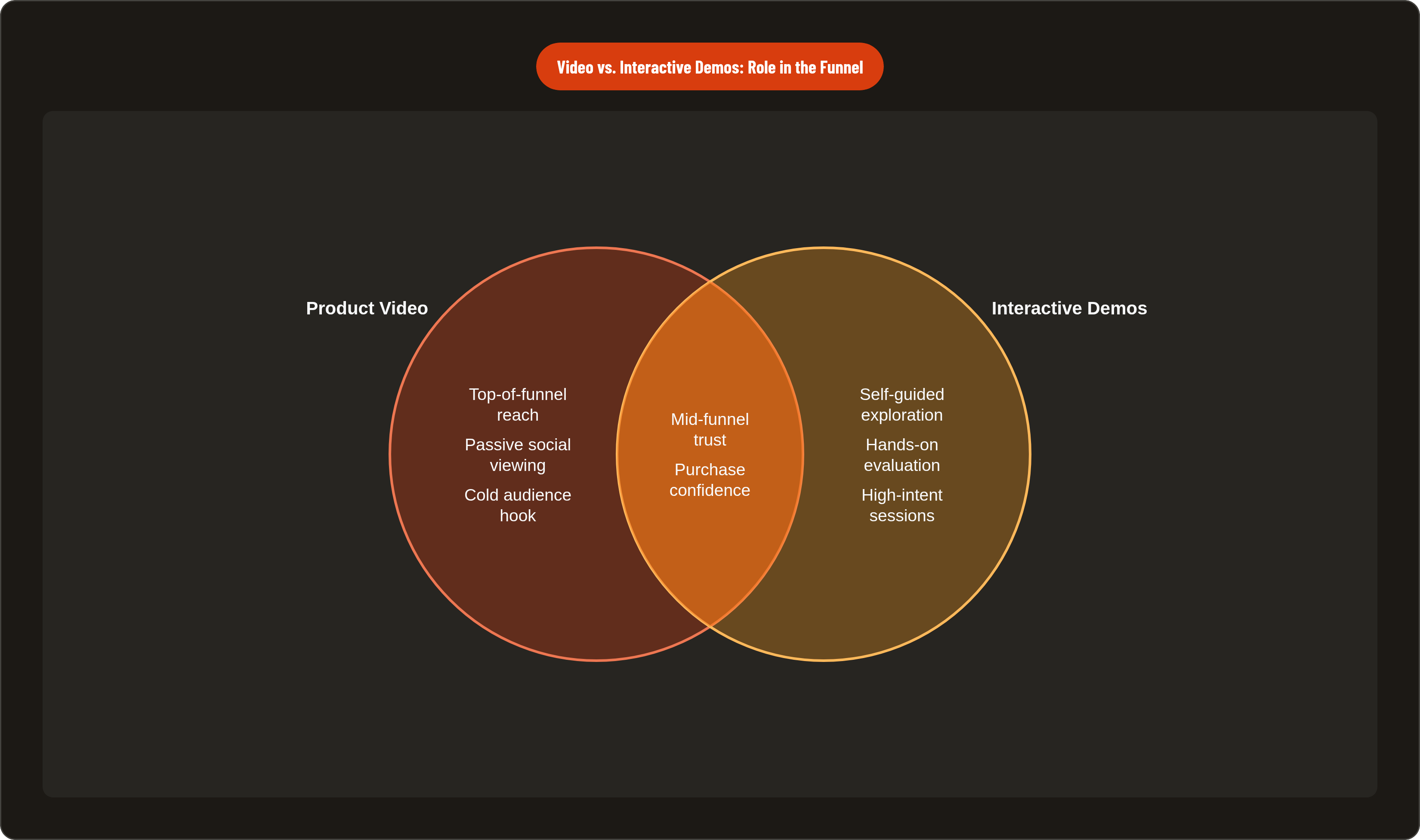
What that figure actually captures is a high-intent behavior. A prospect who opens a self-guided product walkthrough is already leaning in, already willing to explore. Video has to do more work to earn that same intent from a cold audience. That's not a knock on video; it's just a different job.
Interactive demos are strong mid-funnel: post-interest, in self-serve evaluation, when the buyer wants to touch the product rather than watch someone else use it. Video holds its ground at the top of the funnel, where the buyer needs to be moved before they'll invest time in exploration; on social and paid channels where passive viewing is the default; and in async sales outreach where a rep cannot control the viewing environment.
For most SaaS teams, the answer is sequential. Video drives the problem-to-interest moment, and an interactive demo handles the interest-to-confidence moment. A video that ends with "try it yourself" and links directly to a guided product tour is a complete funnel unit, and it's underused.
Narration, visuals, and audio choices that serve the sales purpose
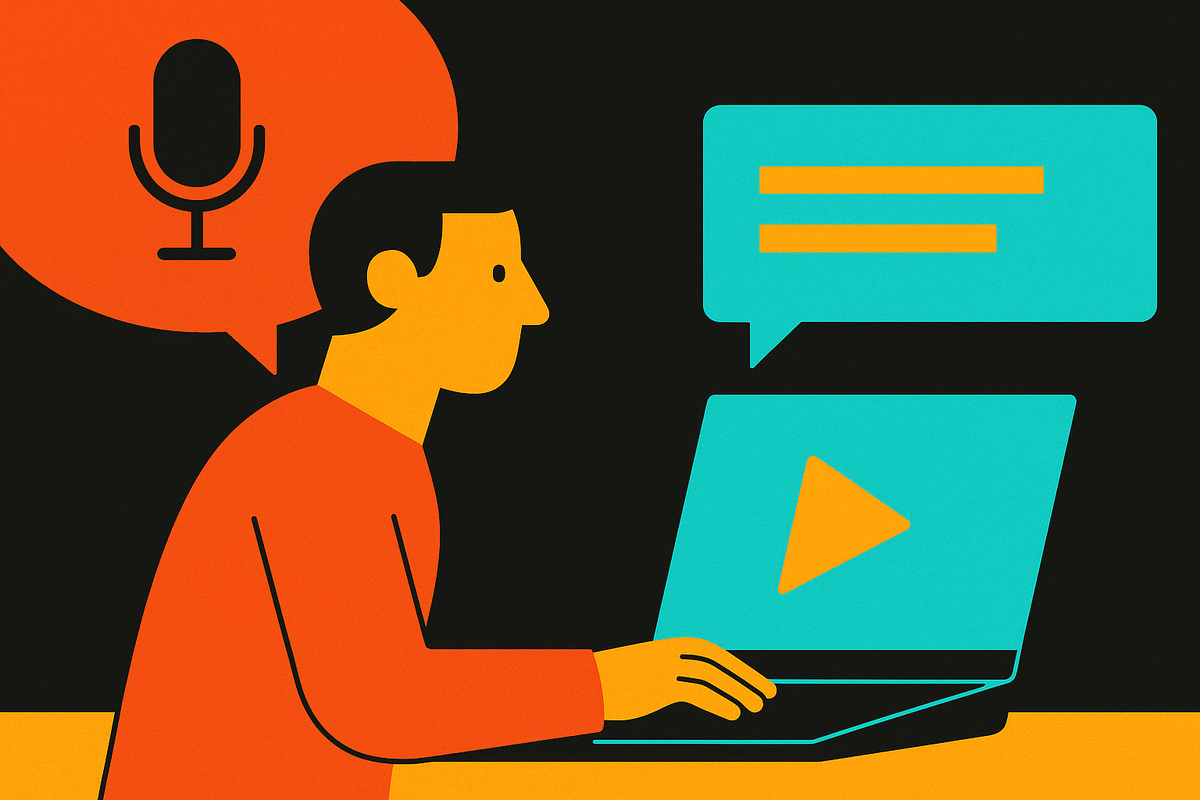
Voiceover carries emotional register and controls pace. Text-only relies on the viewer reading at exactly the right moment, which is a lot to ask of someone who is also watching a moving screen. For sales demos, voiceover wins because it holds the experience together without requiring the viewer to do extra work.
The narration principle is simple and gets violated constantly: the voice should explain the buyer's outcome, not narrate what is happening on screen. "Here we see the dashboard" is a walkthrough. "You're looking at three hours of manual work, done in 30 seconds" is a demo. The difference is not stylistic; it's the entire argument.
On UI presentation: annotated screenshots and zoomed callouts direct attention without asking the viewer to notice something organically. Cursor movement should be deliberate, because fast or erratic navigation creates cognitive load instead of confidence. Dummy data should look real and relevant to the buyer's industry. A generic "Acme Corp" dataset in a financial SaaS demo breaks the scenario before the buyer has a chance to imagine their own problem getting solved.
Background audio sets emotional register, and silence can feel unfinished in a way that makes the viewer distrust the product. Both choices should match the brand's tone, not default to the generic corporate-upbeat track that communicates nothing about what the product actually does.
All of this depends on product knowledge first. A production team that doesn't understand what actually makes the product different cannot make these narration choices well, and polish without specificity produces the generic explainer that looks professional and fails to convert. The work has to start with deep product understanding, then apply production craft, so the narration reflects what actually differentiates the product rather than what fits the template. That sequence is why it matters who you hire for this.
Where to place demo videos and how to measure whether they're working
Placement follows funnel position. On the homepage, a short overview demo captures the widest, least-committed audience and belongs above the fold or immediately accessible from it. On landing pages, embedded video drives up to 86% higher conversion rates, and the video should match the specific ad or campaign promise that brought the visitor there. On pricing and features pages, buyers are already evaluating, so a deeper use-case demo serves them better than a top-of-funnel overview.
In sales outreach, a personalized demo video sent async in a sequence reduces the friction of scheduling a live call while keeping the rep's narrative intact. In-app onboarding is consistently overlooked: 57% of video marketers say video has reduced support queries, per Wyzowl 2026, and demo video as feature introduction shortens time-to-value in ways that compound over the customer lifecycle.
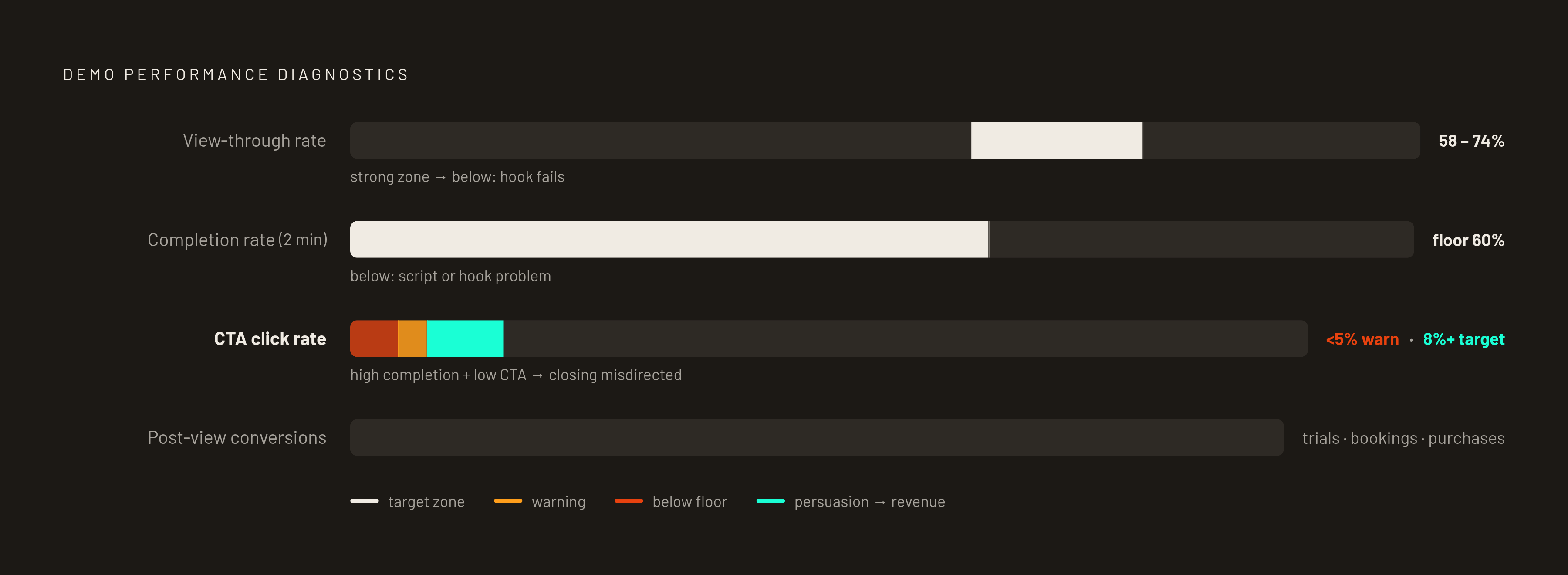
The KPIs that tell you whether the demo is actually doing the sales job:
- View-through rate: 58 to 74% indicates strong engagement for a sales demo
- Completion rate on a 2-minute demo: 60% is the floor; below that, the video is losing the buyer before the payoff
- CTA click rate: 8% or higher is the target; below 5% suggests the call to action is mistimed or unclear
- Post-view conversions: trial sign-ups, demo bookings, or direct purchases, because this is the metric that connects video performance to revenue
These numbers also tell you where the breakdown is. High completion but low CTA clicks means the video persuades but does not direct. Low completion means the script or hook needs rework. Each failure mode points to a different fix, and you cannot tell them apart without the data.
A demo video that no one watches to the end, placed on a page where the buyer is not ready for it, paired with a CTA that does not match the buyer's next step, will underperform regardless of how well it was produced. Placement and measurement deserve the same rigor as the script itself.