Updating SaaS Explainer Videos After a Product Pivot
Audit which video elements your pivot actually changed before rebuilding from scratch.

A SaaS pivot changes the product. It doesn't automatically wreck your explainer video. Most teams treat those as the same event, panic, and rebuild from scratch when half the video was still doing its job. The real work is figuring out exactly what the pivot changed, and touching only that.
Roughly 70% of successful startups, according to CB Insights, changed direction at least once before finding product-market fit. Pivoting isn't a failure state. It's how most winning companies actually got there. But the explainer video sits near the bottom of everyone's post-pivot checklist, right below updating the pricing page and somewhere after the new deck. Meanwhile it's often the first thing a prospective buyer sees, before anyone on your team says a word to them.
Buyers now do most of their homework before sales ever gets a call. Most SaaS buyers complete around 70% of their research before reaching out, which means your video is shaping their decision with nobody from your company in the room to correct it. If it's still telling the old story, that gap isn't a minor inconsistency. It mis-qualifies leads, pulls in the wrong ICP, and quietly tells the right ICP this isn't for them after all.
You'll know the gap has opened when your sales team starts working around the video mid-call. "We don't really do that anymore, let me explain what we actually do now." That sentence, said enough times, is a signal, not a quirk.
What kind of pivot you had determines what the video actually needs
Not every pivot breaks the same parts of the video. Treating a small pivot like a total rebrand is how teams burn budget redoing sections that were fine. The Startup Genome Project's analysis of over 3,200 pivots found four types account for 79% of successful strategic redirections in SaaS. Each one hits your video differently.
Zoom-in pivots narrow the product. Instagram stripping down from Burbn's do-everything app to photo-only is the textbook case. Your feature story probably needs to narrow with it, and your value prop sharpens as a result. But the problem framing often survives, because the core pain didn't change, only the solution got more focused. Audience and tone can stay intact too.
Customer segment pivots are the disruptive ones. Slack is the standard example: same underlying product capability, entirely different buyer. Everything audience-facing changes, ICP language, problem framing, proof points, sometimes even tone. This is the pivot type most likely to demand a full rebuild, because you're not refining a message, you're speaking to a different person.
Zoom-out pivots expand beyond the original niche. The old video, in this case, isn't wrong so much as small. It tells a narrower story than what the product now does, and a feature-centric narrative usually needs to become a platform narrative instead.
Business model pivots (subscription to usage-based, SMB freemium to enterprise) tend to be the most surgical fix of the four. The UI story and feature narrative often survive completely intact. What breaks is the call to action, the value exchange framing, and the pricing language. Sometimes that's a voiceover swap and a new CTA card, not a reshoot.
Before you make any production decision, name which pivot type you actually had. Then map it to the video, instead of defaulting to "let's just redo the whole thing."
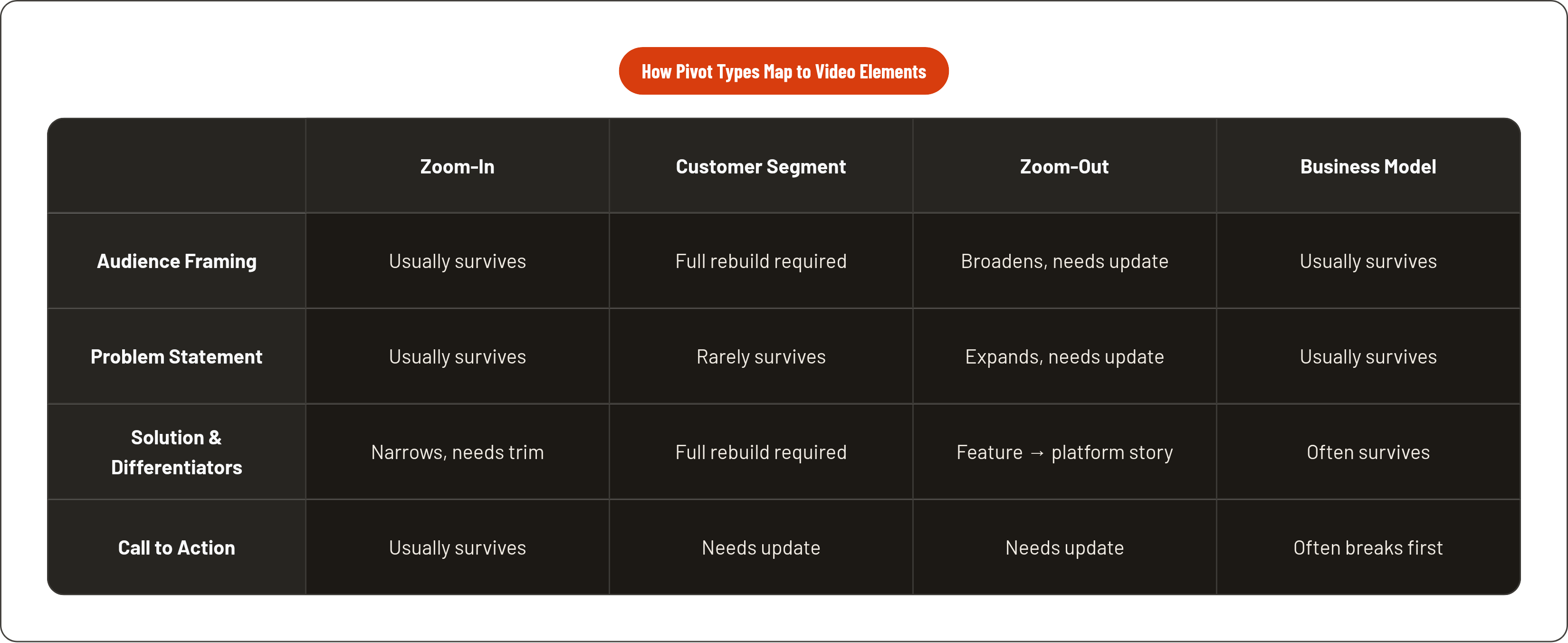
The four elements of an explainer video and which ones a pivot actually touches
Every explainer video breaks into four separable pieces: audience framing, problem statement, solution and differentiators, and the call to action. A pivot rarely touches all four equally.
Audience framing is how the video opens, the language, the job-title assumptions, the pain vocabulary in those first ten seconds. This changes completely in a customer segment pivot. It often survives a zoom-in or business model pivot untouched. The tell that it's broken: your current ICP watches the opening and doesn't see themselves in it.
Problem statement is the most emotionally loaded part of the video, the pain the product claims to solve. A problem framing built around pain that no longer applies to your buyer doesn't just feel off, it actively pushes them away. This piece tends to survive a zoom-in pivot, since the pain is usually unchanged, just solved more narrowly. It rarely survives a customer segment pivot.
Solution story and differentiators are the most vulnerable part of any explainer, in any pivot. This is the product walkthrough, the features on screen, the specific claims about what makes you different. Videos built around problems and solutions age better here than videos built around a UI demo; screen recordings of an interface collapse fast once that interface changes. Worth noting: generic differentiator language, "easy," "powerful," "all-in-one," survives every pivot fine, because it was never saying anything specific in the first place.
Call to action gets neglected constantly, and it's the piece that actually shapes your sales motion. A business model pivot, adding a freemium tier, moving upmarket to enterprise, can make your CTA flatly wrong even when every other part of the video still holds up.
One more layer people forget: 80% of B2B videos get watched on mute, according to Wyzowl. That means on-screen text and captions are carrying your message independently of the voiceover. Audit them as their own layer. Don't assume they still match what the narrator is saying.
How to audit what to keep, what to fix, and what to rebuild
Start with the script and the positioning, not the production file. Production decisions come after the audit, they don't lead it.
Step one: map the pivot type to the four elements. Go through audience framing, problem statement, solution story, and CTA, and mark each one unchanged, partially changed, or fully changed. That gives you a change surface, the actual minimum set of things that need work.
Step two: watch the video as your new ICP would, not as the team that built it. Does the opening problem read like their problem? Does the solution section reflect what the product does today? Would the right buyer nod along at the CTA, or quietly close the tab?
Step three: run it against real deals. Pull your recent wins. Does the video reflect why those customers actually bought? Pull recent losses too, and check whether the video amplified the wrong story for them. If sales keeps correcting the video's narrative on discovery calls, that element needs to change. No debate there.
Step four: separate messaging fixes from production fixes. Some things need nothing more than a new voiceover track, a fresh CTA card, or updated on-screen text, no animation rework at all. Only escalate to a full rebuild when the visual story itself contradicts where the company is headed now.
What to keep: proof points that still hold, emotional beats that land with the new ICP, production quality that's worth preserving rather than tossing. What to fix in place: voiceover, CTA, captions, any text overlay still carrying old positioning. What to rebuild: audience framing, problem statement, solution narrative, whenever the pivot changed who you serve or what you claim to fix for them.
When the audit points to a full rebuild and what that actually costs
An explainer video has a shelf life of roughly two to three years under normal conditions. A serious pivot can collapse that to zero overnight, especially when the ICP, the value proposition, or the whole product category shifts underneath it.
Production costs in 2026 span a wide range depending on what you're building. Simple motion graphics run $1,000 to $3,000. Custom character animation with illustration lands between $3,000 and $8,000. Premium 2D or 3D agency work runs $8,000 to $25,000. Wyzowl's 2024 survey put the average cost of a one-minute animated explainer at $8,457. A specialist studio doing a 60 to 90 second custom SaaS explainer, strategic scripting, custom animation, professional voiceover, two rounds of revisions, starts around $2,500 in 2026.
Geography moves the number too. Advids' 2025 survey found US-based companies averaging $6,300 for a 60-second video, European companies $4,100, and Asian companies $1,800. And costs have been dropping broadly: agencies were delivering comparable quality at roughly 21% lower cost in 2025 versus the year before, largely because of AI-assisted production tooling, per the same Advids survey.
Here's the framing that actually matters: a rebuild is a one-time spend. A misaligned video is a continuous tax on pipeline quality and sales efficiency, running quietly in the background every single day it stays live. McKinsey found that brands realigning messaging to a new target segment within 90 days of a strategic shift recovered pipeline velocity 2.5 times faster than those who dragged it out. That's the case for moving fast once the audit says rebuild.
Timeline matters just as much as cost. A full agency rebuild takes four to eight weeks. Surgical fixes, a voiceover swap, a new CTA, can turn around in days. Knowing which one you actually need before you call a production team saves you both money and time.
Where AI video tools help with pivot updates and where they introduce new risk
The AI video market hit $789 million in 2025 and is projected to reach $3.4 billion by 2033, growing at a 20.3% compound annual rate, according to Grand View Research. Tools are multiplying fast, and for certain content types the quality gap with traditional production has narrowed a lot.
There are legitimate uses here for a pivot update. Regenerating voiceover fast when the script changed but the animation didn't. Updating caption layers and on-screen text to match new messaging without touching anything else. Producing quick secondary assets, social cuts, feature announcement clips, while the primary video gets properly rebuilt on a slower track.
But there's real risk too, and it's specific to B2B. Research on AI-avatar video found brand trust scores drop 18% to 34% compared to equivalent real-presenter content, even when viewers can't consciously tell it's an avatar. For a company mid-pivot, you're already asking a new or expanded audience to trust you again. Stacking a trust penalty from AI-generated presentation on top of that is a bad trade at the exact moment you can least afford it.
By 2026, an estimated 75% of marketing videos will be AI-generated or AI-assisted. That flood is already dragging down perceived quality across the board, which actually cuts in your favor: a pivot refresh done with real care becomes a differentiation opportunity, not a corner to cut. Wyzowl found ROI satisfaction from video sat at 82% in 2026, and separately that 93% of video marketers say video has increased user understanding of their product. More teams are making video. Not all of it is earning results, and the volume increase makes quality more visible, not less.
The honest frame: AI tools compress time and cost for mechanical updates, text, voice, format. They don't do the strategic work of figuring out what actually changed and what the new story is. That part's still on you.
Getting the new script right before anything else moves
The most common mistake after a pivot: teams update the visuals but carry the old positioning language forward untouched, because nobody pressure-tested it against the new direction.
Before production starts, the script needs to answer four questions, and it needs real answers, not placeholder ones. Who, specifically, are we speaking to now, and what do they call the problem we solve? What's changed about how we solve it, and what's stayed the same? What makes us different in the new competitive set this pivot puts us into? And what should this viewer actually do next, in a way that matches our current sales motion, not the old one?
Generic differentiator language falls apart fastest here. A pivot is exactly the moment "easy," "powerful," and "all-in-one" lose whatever thin credibility they had, because your new ICP hasn't built trust in your claims yet. The script is also where you decide what tone signals you belong in this buyer's world, enterprise language versus startup language, technical depth versus business-outcome framing.
Sixty seconds of tight, specific storytelling built on real product knowledge beats a polished two-minute video full of generic claims, every time. Use the pivot as a forcing function to cut whatever was never sharp to begin with.
If your team can't write this script with confidence yet, that's the signal. The internal positioning work isn't done. The video should wait, because shipping a pivot video before the positioning is settled just guarantees you're doing this all over again in six months.
What a well-executed pivot video update actually looks like in practice
Slack is the clean case study for a customer segment pivot: an internal tool built for a gaming company became a B2B team communication platform, and the underlying product capability stayed largely the same. What had to change was everything audience-facing, the tone, the problem framing, the entire visual world the video lived in.
Shopify's zoom-out, moving from an e-commerce site builder to a full commerce platform, required a broader story on screen: a range of merchant types instead of one narrow use case, and a platform narrative in place of a feature-demonstration structure.
A handful of patterns show up consistently in pivot updates that actually work. The problem statement is written in the buyer's language, not the product team's internal shorthand. The differentiator claim is specific, naming exactly what the product does that alternatives don't, in a way that only a team with deep hands-on product knowledge could write. The visual story avoids over-promising on UI that might change again soon, favoring outcomes and workflow over interface screenshots that go stale fast. And the CTA matches the sales motion that's actually running today, free trial, demo request, or a tier-specific entry point, rather than a legacy flow that quietly stopped existing months ago.