Loom vs Vidyard vs Wistia for Demos
Each tool fits a different demo job, so match the platform to the work.
Loom, Vidyard, and Wistia solve different demo problems. Loom fits quick async walkthroughs, Vidyard fits outbound sales tied to buyer activity, and Wistia fits product marketing on your own site. The right choice depends on the work the demo must do. A mismatch creates friction that more features will not fix.
Why Loom, Vidyard, and Wistia are not substitutes for each other
A feature comparison can make these platforms look closer than they are. Recording, sharing, hosting, and analytics all sound like parts of the same job. Sending a colleague a quick explanation is not the same job as helping a rep follow up with a named buyer. Neither is the same as converting visitors on a product landing page.
The strongest objection is simple enough. If all three let people watch a demo, are the differences really that large? They show up in the work around the video. Vidyard can host a marketing page, but that does not give it Wistia’s fit for branded, on-site conversion. Loom can deliver a sales walkthrough, but sharing that link is different from feeding buyer activity into a sales workflow.
What Loom is actually built for and where it breaks down
When recording stops, it generates a shareable link and automatically copies it to the clipboard, provided browser clipboard access is enabled. The handoff is the point of the product. A short walkthrough can replace a meeting without turning into a production task, which makes Loom a strong fit when the explanation is useful now and needs little packaging.
Product teams can walk through builds, support teams can reproduce bugs, and colleagues can share async feedback. An early-stage founder can also send a prospect a direct explanation over Slack or email. That is still a sales conversation, with relationship speed as its immediate goal. A simple recording tool meets that need without a larger sales system around it.
Branded video hubs, gated content, and on-site conversion workflows fall outside Loom’s intended uses, and its lead-capture capabilities are limited. Loom’s support documentation says Business and Enterprise plans have Engagement Insights, which include completion rate and call-to-action conversion rate. That is more than a simple view notification, but it is not the contact-and-account intelligence that connects demo engagement to CRM action.
After the Atlassian acquisition, Loom’s early 2026 billing change did away with the free Creator Lite seat and began charging for every workspace member. Creator Lite was a role with limited recording capabilities as well as viewing access. That distinction is important when comparing old and new costs. For organizations using Loom across departments, the practical question is whether its speed still justifies the per-team bill as membership grows.
What Vidyard is actually built for and what the analytics pitch really means in practice
Vidyard starts where a communication-first tool stops. Its defining job is to feed buyer behavior back into the sales workflow at the contact and account level. A watched demo becomes a CRM signal. Rather than simply reporting engagement with a video, it can show which named contact at which account watched, what percentage they completed, and when they watched. That activity can surface as an updated record in Salesforce or HubSpot.
The detail gives “viewer-level intelligence” a concrete meaning. Vidyard shows view counts for each contact and account, heatmaps of which seconds viewers rewound or skipped, and engagement scores for each viewer. Alerts can reach reps through Slack or Salesforce, much like email-open alerts. Deal attribution adds another layer. A sales team can see which people from a target account watched, what their roles are, and the average completion rate, rather than treating the account as one anonymous view.
Those signals are useful only if someone acts on them. A rep who needs to follow up with specific buyers has a reason to use that detail. A small startup sending occasional demos may not. The common buying mistake is being impressed by the platform demonstration and then using little of the platform after purchase. Analytics are not a result by themselves, and collecting more of them does not create a working outbound motion.
Access to that workflow depends on the plan. Vidyard’s pricing page lists Starter rates for those who pay by the year or month, but Teams and Enterprise need a custom quote. CRM and marketing automation integrations with Salesforce, HubSpot, and Marketo start at Teams. Unlimited integrations, the API, custom metadata, and SSO are Enterprise features. Getting all those features takes a plan above Starter, which already has one of the higher entry-level prices per seat on the market. The Video Agent add-on adds another per-seat charge.
Vidyard’s 2026 additions add editing conveniences and extend the sales job. AI Avatar technology uses a short clip recorded once to generate talking-head videos in the user’s likeness across supported languages. The Video Sales Agent goes further. It generates personalized videos automatically in response to buyer signals, including content downloads and demo bookings, through HubSpot, Marketo, or Salesforce workflows. These are significant tools for high-volume personalization, but their strongest fit is a team whose outbound motion already works.
There is also a practical operational risk. Chrome extension reliability is a known complaint, which is relevant when recording sits inside a rep’s daily workflow. The buying decision includes both the intelligence the team needs and the recording workflow it will depend on.
What Wistia is actually built for and why its pricing model reflects a different value proposition
Wistia is built for video on the company’s own domain. The video lives there, viewers stay in the marketing funnel, and engagement becomes structured marketing data. The destination is central to the product. Gated webinar replays, product demo hubs, branded resource centers, and landing pages all fit because video serves as a conversion layer inside a broader marketing experience. The job is not just getting a recording in front of someone.
Its heatmaps support that job at the individual-viewer level. Wistia’s support documentation describes identification through a Wistia Form or an email campaign link, while its embed documentation allows a CRM ID as the identifier. Identification is the important qualification here. With a viewer tied to an email or CRM record, the heatmap shows which parts they watched, rewatched, or skipped. Wistia’s HubSpot integration also puts those heatmaps inside contact records, supporting follow-up based on specific demo engagement.
The 2025–2026 AI expansion addresses another part of publishing. Automatic transcription, AI-generated chapter markers, AI-generated highlight reels, and transcript-based library search cut the post-production work for teams that publish a lot of video. These features support an existing body of video. They help a marketing team prepare and use that library without changing the central premise that the video belongs inside its own branded experience.
Wistia has no native screen recording, so teams need a separate way to make videos. A team making quick walkthroughs needs another tool for that step, and many teams use Loom to create videos before publishing them in Wistia. That adds a second subscription to the workflow. The combined cost is a frequent reason teams evaluate Vidyard as an all-in-one option, although the savings question remains separate from the fit of the publishing workflow.
Costs scale steeply, jumps between tiers can be disproportionate, and CRM-ready analytics sit behind Advanced. A team using branded video, gated content, and engagement data to support lead generation is buying a different outcome from a team that only needs somewhere to put recordings. The cost is easier to justify when those conversion capabilities are part of the actual work.
How to match the tool to the actual demo job your team is doing
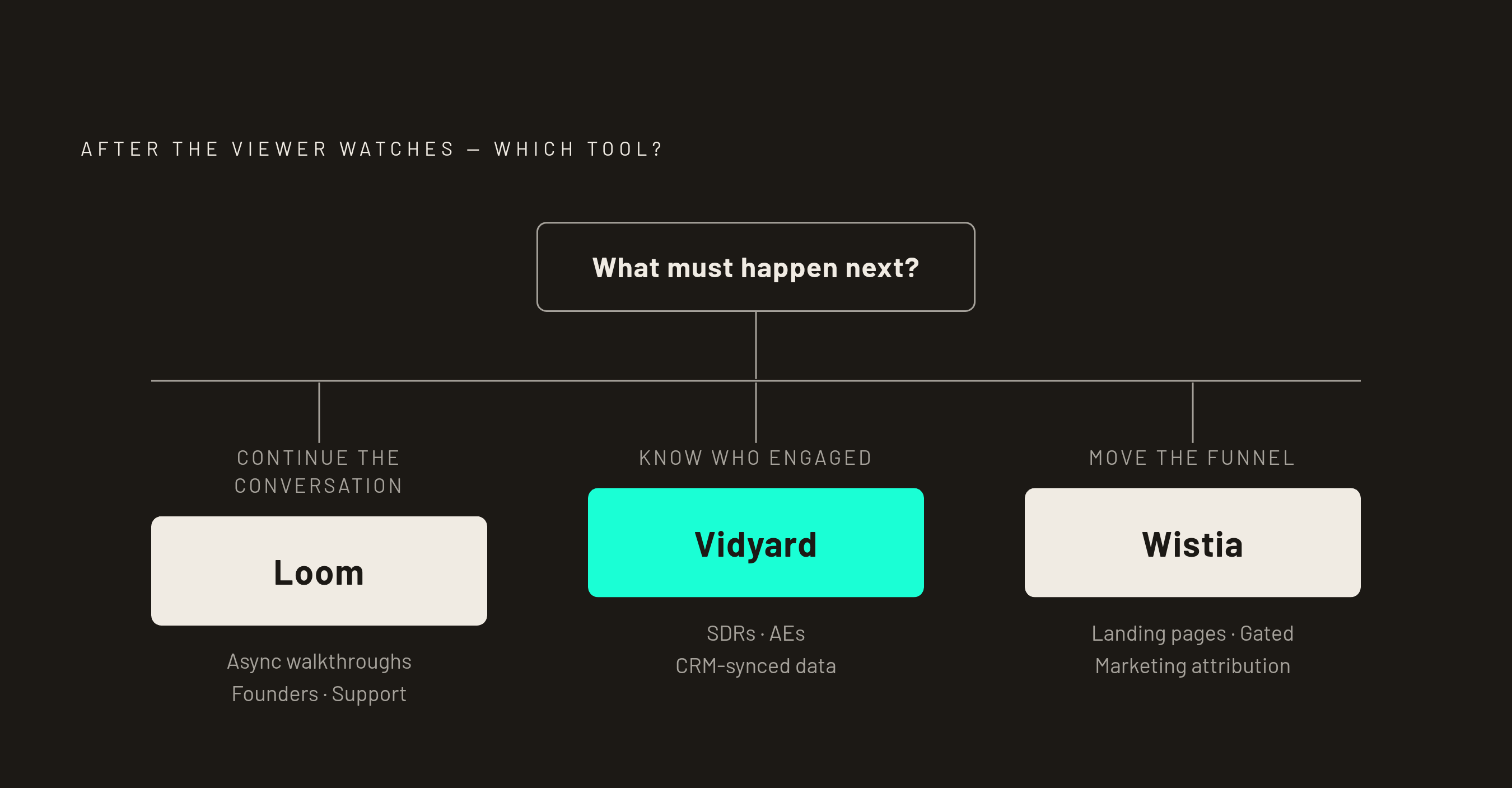
The diagnostic starts with what must happen after the viewer watches. Does the demo need to resolve a question, inform a sales follow-up, or support conversion on a website? That separates the jobs more clearly than headcount does. Budget still constrains the purchase, but team size alone does not identify the right platform. A founder and a large product department can need the same fast walkthrough workflow for very different reasons.
If the next step is simply continuing a conversation, Loom fits. The signals are founders explaining a product to early prospects, product teams walking through builds, and support teams reproducing issues. Speed outweighs analytics depth in these situations. The caveat is the early 2026 billing change, so teams spreading Loom across departments should evaluate whether the per-seat calculation still holds as membership grows.
If the next step depends on knowing who engaged, Vidyard fits. This includes SDRs who send personalized outreach at scale and AEs who send post-demo follow-ups. The decisive requirement is CRM-synced engagement data that someone will use. Teams and Enterprise pricing belongs in that decision because the relevant integrations do not start at Starter. AI Avatar and the Video Sales Agent become relevant when an established outbound workflow needs high-volume personalization, rather than when a team is still figuring out its sales motion.
If the next step happens inside a marketing funnel, Wistia fits. The signals are demos on landing pages, gated content generating leads, branded players, and attribution tied to video engagement. Here, the publishing environment is part of the job. Teams need to plan for a separate tool to make videos, steep rises in price, and the Advanced tier to get CRM-ready analytics.
Enterprises often end up using Loom for internal communication, Vidyard for sales, and Wistia for marketing. Paying for all three can make sense when they serve three different workflows with different owners and goals, while forcing one tool into all three can cost teams time and effort each day.
Where custom demo video fits alongside self-serve tools
Once the platform fits the workflow, the content becomes the next variable. A video can be fast to record, closely tracked, and cleanly hosted yet fail to explain what makes the product different in its first moments. The common failure is filling good distribution infrastructure with generic screen recordings that describe features without making a case for the product’s unique value.
A custom-built demo addresses that gap with a scripted argument for differentiation, designed around a specific buyer job. A custom-built demo complements the platform by sitting inside Wistia or Vidyard just as a self-recorded video does, so the hosting decision and the content decision remain separate. Improving one does not require abandoning the other.
Scrappy B2B SaaS teams with deep product knowledge and a clear sense of their difference are strong candidates for this approach. Production requires distilling that knowledge into an explanation a buyer can grasp quickly. The platform can put the demo in the right place and report what happened, but the demo still has to make the case.