Building a Sales Enablement Video Library for a SaaS Product
Organize your video library by buyer stage and question, not by video format.
Most SaaS teams don't have a video content problem. They have an architecture problem. The videos exist; the problem is that nobody can find the right one in the middle of a live deal, so reps default to a generic deck or nothing at all, and the library collects dust.
That's the real cost. Not production spend. Not creative quality. The cost is a rep who opens a shared drive, can't locate anything useful in ten seconds, and sends something forgettable instead. Multiply that across every deal at every stage, and you're looking at a meaningful, measurable drag on pipeline that never gets attributed to content because it's invisible. The fix isn't more video. It's a library built around when a buyer needs something, not around how the creative team organized the output.
How the B2B buyer's behavior has shifted the job video needs to do
The modern B2B buyer completes a significant portion of their journey before they ever speak to a sales rep. That window, which used to be filled with discovery calls and early-stage demos, is now filled largely with self-directed research. Video is often the only "sales interaction" that happens during that time.
Add to that the generational shift in who's making buying decisions. Millennial and Gen Z buyers tend to involve a wide circle of internal influencers before they'll even engage a vendor. One champion watching your video isn't enough. That video needs to be something they'll forward to a skeptical CFO, a cautious IT lead, a curious VP who just got looped in at the shortlist stage.
Gartner's 2025 research made the direction explicit: a growing majority of B2B buyers now prefer a rep-free buying experience. That preference has a structural consequence. When buyers are avoiding live conversations, your video library isn't supporting the sales motion. It is the sales motion, at the stages that matter most.
SaaS products carry an additional wrinkle. A large share of software buyers won't book a live demo until they've already seen a functional product walkthrough on their own terms. The library literally gates the pipeline. No self-serve walkthrough that answers the right questions means no meeting request. This is not a hypothetical loss; it's a quantifiable drop in inbound conversion that most teams attribute to ads or SEO while the video shelf sits empty at the consideration stage.
The reframe this demands is simple but consequential: a video library isn't a content archive. It's a distributed sales team, available at every hour the buyer chooses to engage, without a rep in the room.
Why organizing by video type produces a library no one uses
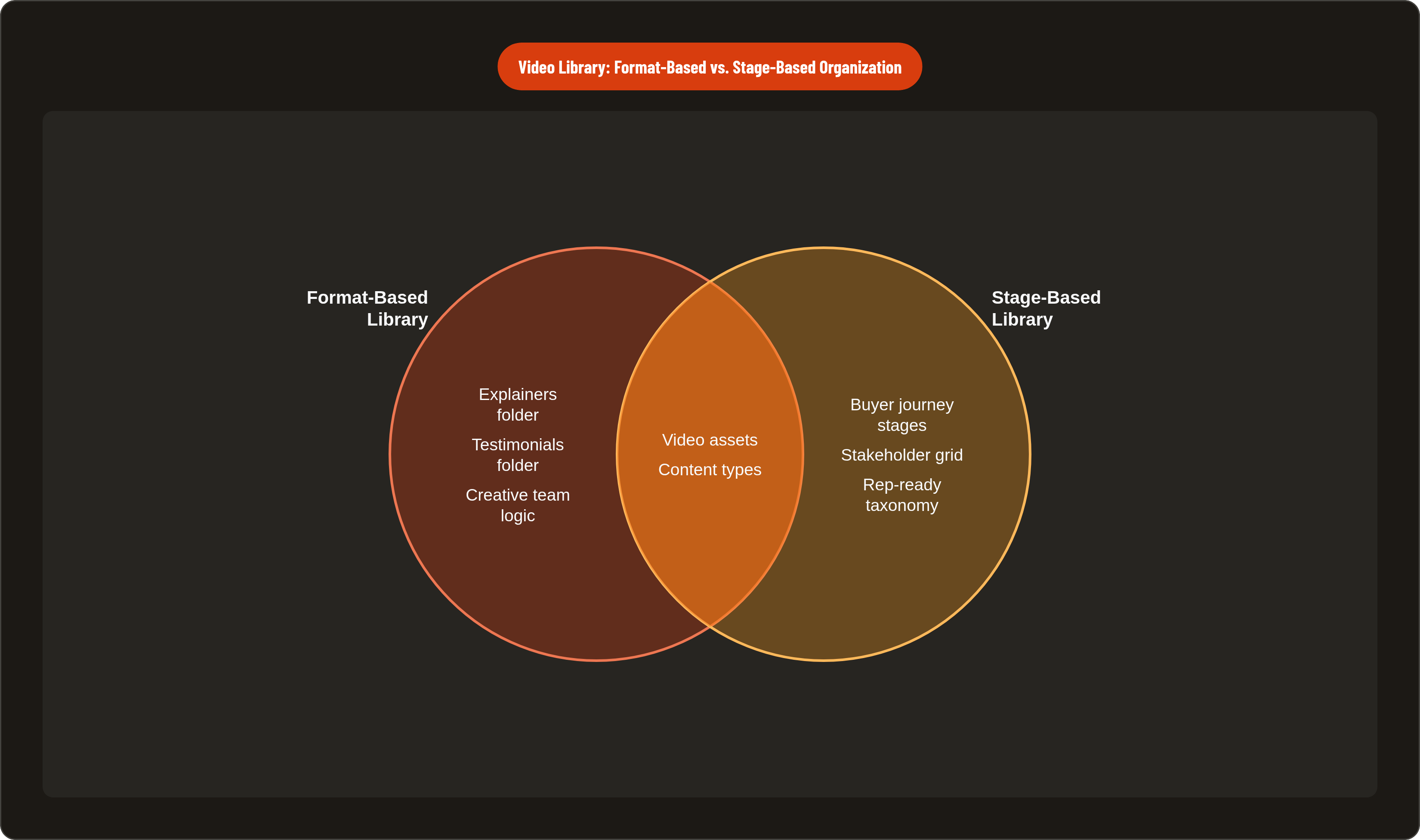
Walk into most SaaS companies and ask to see their video library. What you'll find are folders named by format: "Explainers," "Demos," "Testimonials," "Product Walkthroughs." That structure reflects how the creative team thinks. It has almost nothing to do with how a rep thinks at 3 PM on a Tuesday with a deal in flight.
A rep in an active deal doesn't ask, "Do we have a testimonial?" They ask, "Do we have something for a CFO who's nervous about switching costs at the shortlist stage?" Format-first taxonomy forces them to do translation work: locate the format, then determine whether it fits the moment. That cognitive load, even when it's modest, is often enough to abandon the search entirely.
The deeper problem is that the same video can be exactly wrong at one stage and exactly right at another. A detailed product walkthrough that loses a cold prospect who hasn't bought the problem yet is perfect for a warm buyer who's already sold on the category and needs to see the mechanics. Organizing by format erases that distinction. The walkthrough lives in the walkthrough folder regardless of when it should be used.
Format-based organization also creates invisible gaps. Teams feel covered because every format box is checked, because they have an explainer, a demo, a case study. Meanwhile, entire buyer moments go unaddressed because nobody mapped what buyer question each asset was built to answer. You can have fifty videos and still have nothing for a CFO at the decision stage or a new user trying to reach their first win post-sale.
The fix is a taxonomy built around the question the buyer is actually asking at each stage. That mapping has to happen before a single video is briefed, not after the library is already full.
Mapping the buyer journey stages a SaaS video library actually needs to cover
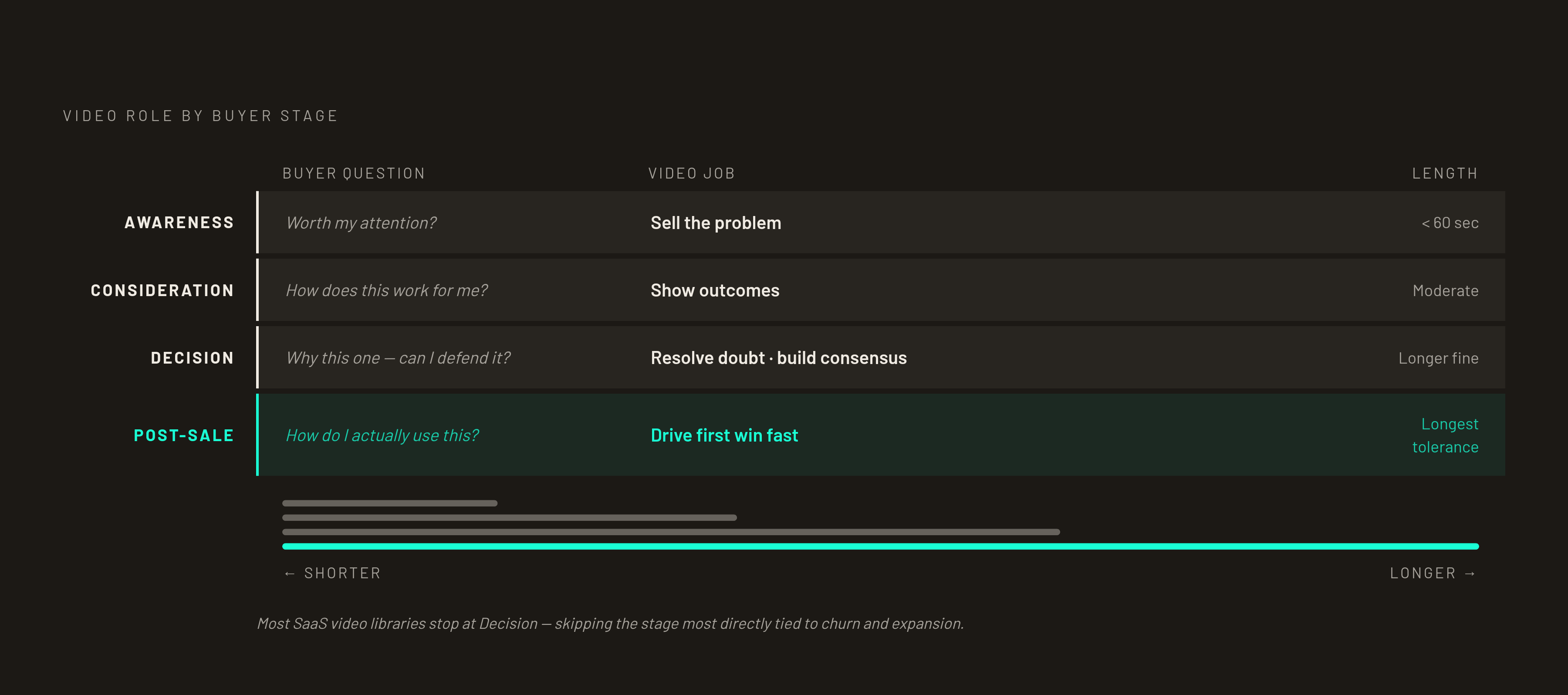
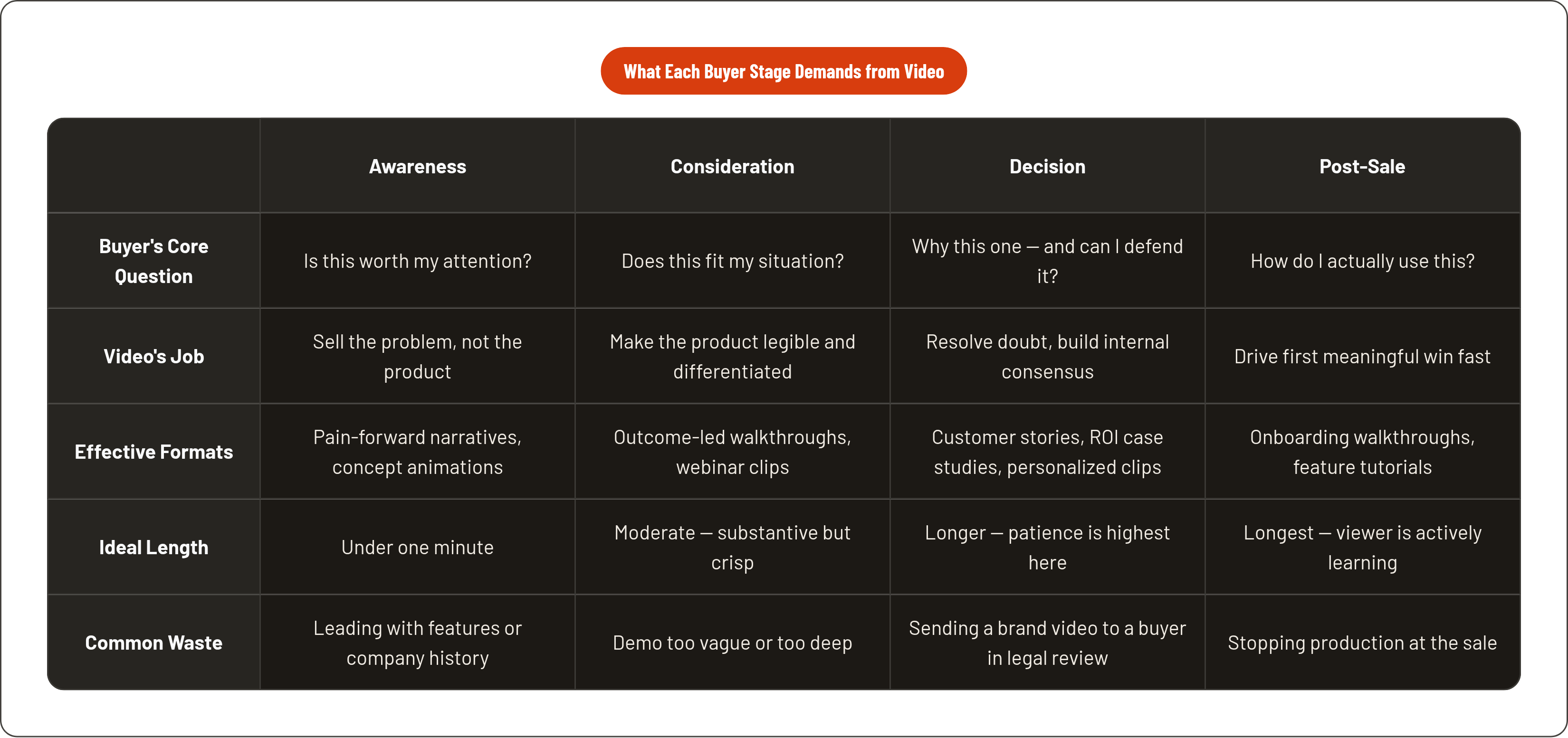
Four stages are worth building for explicitly: Awareness, Consideration, Decision, and Post-Sale. Each represents a distinct buyer question. Each demands a different kind of video. And each has different tolerance for length, depth, and tone.
At Awareness, the buyer is experiencing a problem but hasn't committed to solving it. The question they're asking isn't "should I buy this product?" It's "is this worth my attention?" Video at this stage has to earn the right to be watched before it earns the right to be believed.
At Consideration, the buyer is actively evaluating solutions. The question shifts to "how does this work and does it fit my situation?" They already accept that the problem is real. Now they want to understand if your solution is the credible answer.
At Decision, the buyer is comparing specific vendors and building internal consensus. The question becomes "why this one, and can I defend this choice to the people I have to bring along?" This stage is where video works hardest, because the champion often needs an asset they can forward to a skeptical stakeholder without a rep attached.
At Post-Sale, the new customer needs to reach their first meaningful win as quickly as possible. The question is "how do I actually use this?" This stage is the one most libraries skip entirely, which is a significant error given its direct relationship to churn and expansion.
One important nuance: these stages are not linear for every person in the deal. A champion may be at Decision while a new stakeholder they've just looped in is at Awareness. The library needs to serve both simultaneously, which is why a single video mapped to a single stage isn't enough. You need assets at each stage.
The stakeholder dimension sits on top of stage. The same Consideration question looks materially different for a practitioner evaluating daily usability versus a CFO evaluating total cost of ownership. A grid, not a list, is the right mental model: stage on one axis, primary stakeholder on the other. Each cell is a potential asset. Empty cells are real gaps, not hypothetical ones.
What each stage actually needs from video, and what wastes the slot
Awareness
The job here is to sell the problem, not the product. A viewer at this stage should feel understood before they know what you make. That's the sequence that works: first, resonance; then, credibility; then, solution. Think of it like a first date — you don't propose before you've ordered appetizers.
Effective formats include short, pain-forward narratives; concept animations that dramatize the cost of the status quo; and founder or practitioner perspectives on the category problem. Length should be short. Long enough to land the pain, short enough to hold someone who was scrolling a feed thirty seconds ago. Anything over a minute is fighting the context it's being watched in.
The common waste at Awareness is leading with product features or company history before the viewer has any reason to care. Nobody is interested in your product yet. They're only interested in whether you understand their problem.
Consideration
The job here is to make the product legible and differentiated. The viewer already wants a solution; now they're deciding if this is the right one. They have patience that an Awareness viewer doesn't.
Effective formats include product walkthroughs that show outcomes rather than UI, explainers that answer "how does it actually work for someone like me," and webinar clips that demonstrate real use cases with real stakes. Explainer videos are used by a large majority of marketers specifically to move buyers from Awareness to Consideration. This is the stage where that investment pays off most directly.
Length can be moderate. The viewer is invested enough to watch something substantive, but crisp editing still matters. The common waste is a demo so high-level it could describe any competitor, or so detailed it belongs at the Decision stage. Consideration video is about fit, not about closing.
Decision
The job here is to resolve doubt and build internal consensus. The champion is often forwarding this video to someone who wasn't in any of the earlier conversations. That person needs to arrive at conviction quickly, without a rep to guide them.
Effective formats include customer story videos with specific, named outcomes; comparison content that addresses the shortlist honestly; ROI-anchored case studies; and personalized outreach clips that reference the prospect's specific situation. Adding video testimonials to proposals produces a meaningful lift in close rates, and this is the stage where that format earns its place, not earlier.
Length can run longer here because the viewer is actively looking for reasons to commit. Patience is higher at this stage than anywhere else in the funnel. The common waste is sending a top-of-funnel brand video to a buyer who's already in legal review — it's like showing someone a restaurant menu after they've already paid the check. It signals that the rep doesn't know where the prospect is in the deal, which is exactly the wrong signal to send at the finish line.
Post-Sale
The job is to get the customer to their first meaningful win as fast as possible. This reduces churn, reduces support load, and creates the conditions for expansion revenue. It also happens to be the stage most SaaS video libraries ignore completely.
Effective formats include step-by-step onboarding walkthroughs, feature-specific tutorials keyed to the user's plan or tier, and feature update videos that explain what changed and why it matters. Length can run longer here than at any other stage because the viewer is actively seeking detailed guidance, not being sold to.
The common omission is stopping all video production at the sale and leaving post-sale entirely to written documentation. Written docs have their place, but they are passive. A well-built onboarding video that shows the exact sequence a new user needs to follow is both faster to consume and more likely to be completed. Libraries that miss this stage leave churn on the table.
Structuring the library so reps can find the right video in under ten seconds
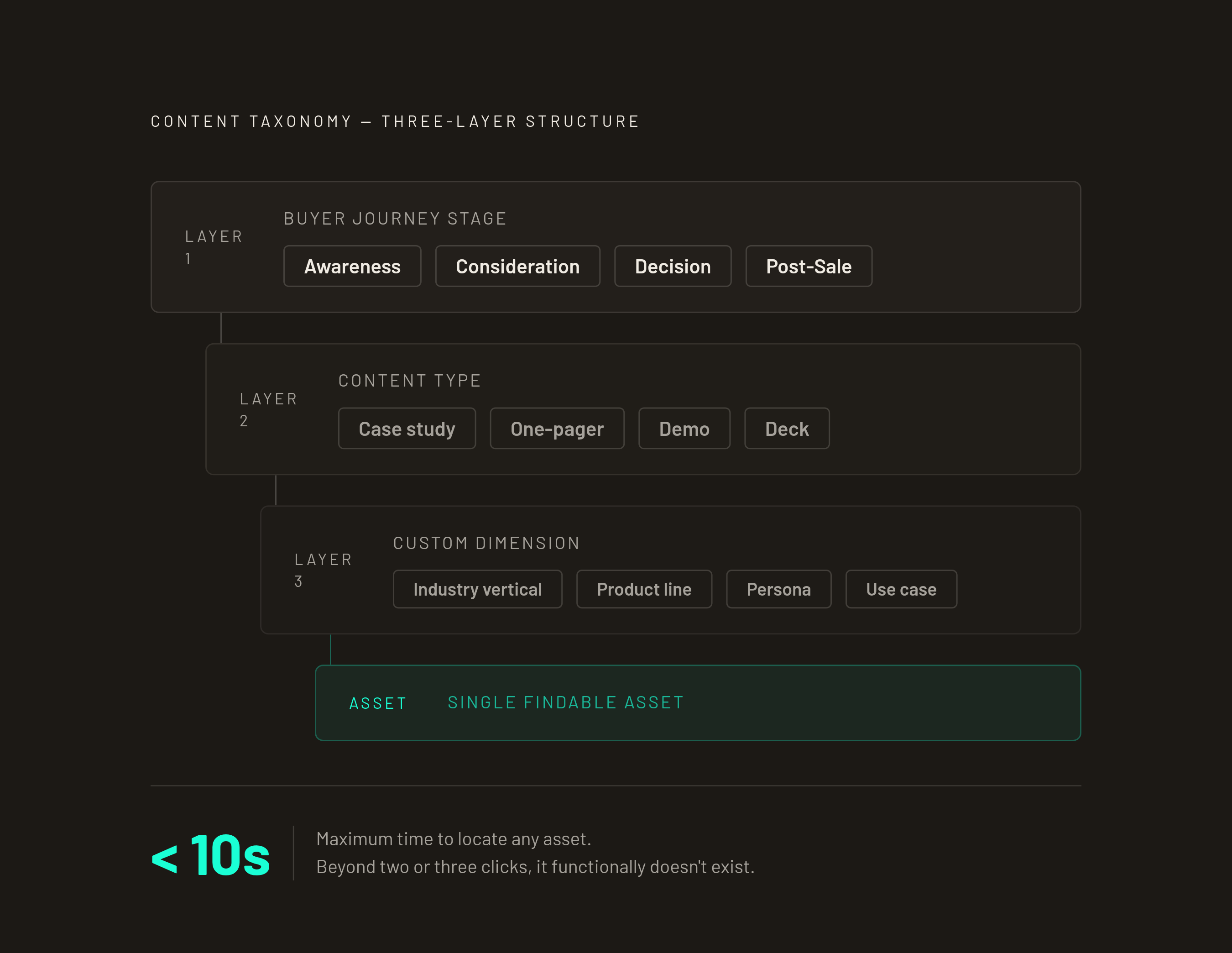
Ten seconds is the real threshold. If a rep has to click through more than two or three levels of folders, the content functionally doesn't exist for them in that moment. They'll send something else, or nothing.
A three-layer taxonomy scales without collapsing. The first layer is buyer journey stage: Awareness, Consideration, Decision, Post-Sale. That's the primary organizing principle, always. The second layer is content type, used only as a secondary filter after stage. The third layer is one custom dimension that matches how your team actually sells: industry vertical, product line, persona, or use case. Choose one and hold it. A library trying to filter across four custom dimensions at once becomes unsearchable almost immediately.
Situational labels outperform date-based or format-based labels. "Objection: switching cost concerns" is findable in the middle of a live deal. "Q2 Customer Stories" is not. Name assets for the moment they solve, not the moment they were made.
Governance is where most libraries quietly fail. Marketing should own brand standards and production briefs. Sales enablement or RevOps should own the platform, the taxonomy, and the retirement schedule. Without that split, the library grows without pruning. Outdated videos stay live because nobody owns the decision to pull them. The taxonomy decays as volume increases because the people adding content aren't the people responsible for keeping it navigable.
Taxonomy decay is a genuine failure mode. A structure that works cleanly at thirty assets often breaks at one hundred and fifty, not because the structure was wrong but because nobody restructured it as the library grew. The fix is periodic restructuring based on how reps actually search, which means asking them, not inferring it from folder analytics.
A healthy library also separates buyer-facing assets from internal enablement content. How-to-sell recordings, objection handling walkthroughs, competitive positioning videos: these belong in the same system, but in clearly labeled sections that don't bleed into what gets shared with prospects. Reps need both. The taxonomy should make the distinction obvious.
The next evolution of this is predictive enablement: systems that surface the right video automatically based on CRM deal stage and prospect profile, rather than waiting for a rep to search. This is already functional in some modern sales enablement platforms. It reduces the time a rep spends hunting for content from minutes to seconds, which compounds across a team at scale.
Measuring whether the library is actually working
Total views and production volume are the wrong measurements. They confirm the library exists. They say nothing about whether it sells.
The right question is which videos appear in closed-won deals and which ones sit unwatched in the platform. That requires linking video analytics to CRM data, which most teams don't do by default but which most modern enablement stacks support.
Stage-appropriate metrics make the picture more granular. At Awareness, watch rate and reach matter most. A healthy B2B watch rate falls roughly in the range of four to six out of every ten viewers completing the video; below that, the hook isn't working. At Consideration, click-through rate on CTAs embedded in or following the video is the signal: are viewers taking the next step the video was designed to prompt? At Decision, deal correlation is the metric: does sending this specific video correlate with deals moving forward or closing? At Post-Sale, support ticket volume and feature adoption rates are the proxies. If onboarding videos are working, both should move in a favorable direction.
Audit cadence matters more than most teams realize. A quarterly review of the most-used assets catches drift early. A full library audit every six months prevents content bloat and catches outdated claims before a rep sends them to a live prospect. The worst version of this problem is a rep forwarding a video that references a pricing structure or feature set that no longer exists. It happens constantly in libraries without a retirement schedule.
The optimization loop should close directly into the production brief. If the Consideration slot for a specific vertical is underperforming, that's a content gap, not a rep problem. Libraries that evolve based on deal data rather than committee opinion stay useful as the product and the market change. Libraries that don't, decay.
How to start building when you don't have the budget or time to fill every slot at once
The common trap is trying to build the complete library before launching any of it. That approach produces a months-long production effort and a library that's already partially outdated when it goes live.
The better approach is to identify the one stage where lost deals are most expensive and start there. For most SaaS teams, that's Decision. Losing a prospect at the Decision stage means you've already paid to acquire them through every earlier stage. A single well-built customer story video or a personalized demo clip at Decision often delivers more pipeline impact than a full suite of Awareness content built speculatively.
Repurposing reduces the production burden significantly. A longer recorded demo can yield a Consideration-stage walkthrough, a short Decision-stage clip addressing a specific objection, and a Post-Sale onboarding reference. Three library assets from one recording session, if the session is planned with that output in mind. Aligning script and storyboard to a specific stage and audience before production begins eliminates a large share of revision cycles. The clarity that comes from journey-stage mapping pays off directly in production efficiency.
Personalization at scale is more achievable than it sounds. Reps don't need a custom video for every prospect. They need a well-built core video they can introduce with a short personalized clip that references the prospect's specific situation, their industry, a challenge they mentioned, a concern that came up on a call. That combination is more effective than a generic send and more scalable than full custom production.
The minimum viable library is one video per stage, each with a clear job to do, organized so a rep can find it in a live deal. That beats one hundred videos that nobody can locate. Start there. Measure it. Build the next slot the data tells you to fill.